Remixlive - Make Music & Beats
- 4.4
- Rating
- 10.00M
- Installs
- Free
- Price

 Analysis by App-foxy
I found Remixlive - Make Music & Beats much easier to approach than many music-making apps. It looks built for people who want to create something immediately rather than spend an evening learning a full digital audio workstation. I can open a session, tap a few musical parts, add an effect, and hear a recognizable loop taking shape within minutes. That quick feedback is the main reason I would recommend it to a friend who is curious about beat-making but does not yet own a keyboard, controller, or studio setup.
At the same time, this is not a complete replacement for a traditional recording program. Its strength is live, tactile arrangement: launching loops, working with drum pads, shaping a groove, and performing changes in real time. If you want detailed multitrack editing, extensive mixing control, or a conventional timeline-first workflow, you may eventually find its approach restrictive. For a first step into mobile music production, though, it offers a friendly balance between playfulness and useful control.
What Remixlive feels like in everyday use
Remixlive is a free Music & Audio app from MIXVIBES, and its central idea is straightforward: build music from playable elements instead of starting with a blank timeline. The app combines loops, drum pads, effects, and MIDI controller support in a workspace intended for creating and performing. That makes it feel closer to a compact live remix instrument than to a miniature version of a desktop studio.
You May Also Like

 Blood Strike: 2.5 Anniversary
Blood Strike’s Loadouts Turn Every Drop Into a Tactical Gamble
A close look at Blood Strike’s custom loadouts: how fast access to signature weapons reshapes its battle royale rhythm, rewards preparation, and narrows the gap between fights.

 Pandora - Music & Podcasts
Pandora’s Music Is Easy to Start, but Harder to Recover
Pandora’s strength is its low-effort path from a seed to a station. Its weak spot is how much confidence it asks you to place in connection, setup, and quiet recovery.

 8 Ball Pool
 Is Built on Rivalries, Rematches, and Routine
A close look at the rivalries, rematches, shared routines, and unanswered safety questions that turn a quick pool match into a persistent mobile community.

 Samsung Music
’s Quiet Strength Is Playing What You Already Own
Its reach comes less from spectacle than from dependable access to a personal library. That simplicity is both the app’s strongest retention engine and its ceiling.

 AccuWeather: Weather Radar
AccuWeather Review: A Quick, Clear Forecast for Everyday Decisions
For everyday plans, the best forecast is the one you can understand quickly. AccuWeather makes rain timing, radar, and local conditions easy to act on, with a few trade-offs.

 Hill Climb Racing
Why Hill Climb Racing Still Turns Crashes Into One More Run
A tiny car, a bumpy hill and one more upgrade: Hill Climb Racing keeps resurfacing because its simple chaos makes every near-miss feel personal.
More From Our News Desk



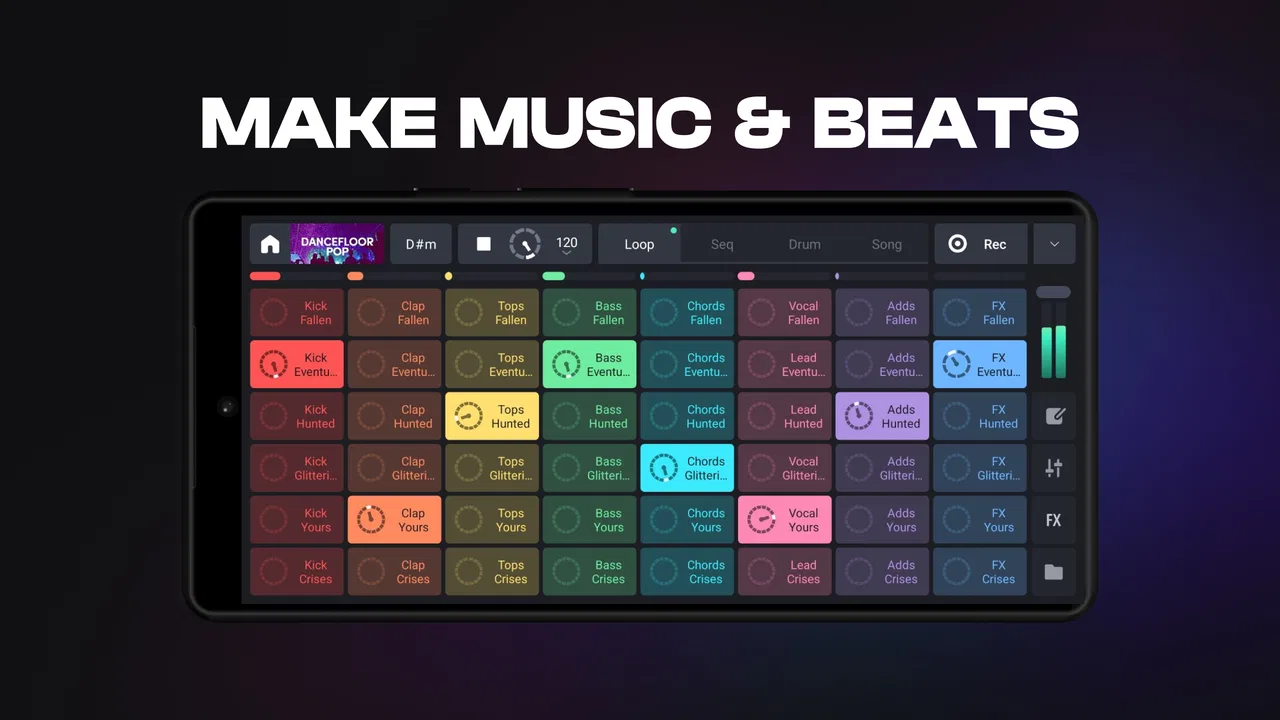
My first impression was that the grid encourages experimentation. Rather than asking me to understand every technical setting before hearing anything, it gives me musical pieces that can be triggered and combined. This is particularly useful for beginners because the first result does not depend on knowing how to program a complete drum pattern or arrange a song from silence.
The app has been available since October 26, 2016, and its current version is 8.6.2. It runs on Android 6.0 or later, so it is accessible on a wide range of devices. Its Everyone age rating also makes it suitable for a broad audience, although the creative depth means younger users may still benefit from some guidance when exploring purchases or more advanced controls.
There is a practical reason the app has attracted a large audience: it has passed ten million installs and holds a 4.4 average from roughly seventy-seven thousand ratings. Those figures do not guarantee that it will suit every workflow, but they do suggest that the basic concept works for many people. I would describe it as an inviting entry point rather than an all-purpose studio.
What to expect before making your first beat
The most important expectation to set is that Remixlive rewards performance more than precision editing. You are encouraged to launch musical parts together, mute them, bring them back, and alter the energy with effects. That means the first satisfying moment can arrive quickly, but the app may feel less natural if your goal is to draw every note into an exact arrangement.
I also noticed that the quality of the result depends heavily on choosing compatible parts. A strong combination can sound polished with very little effort, while mismatched loops can make the session feel cluttered. This is not a flaw unique to the app; it is part of working with loop-based music. Still, beginners should know that the best results usually come from selecting a small musical idea and developing it rather than activating everything available at once.
The free starting point is helpful for testing the workflow without committing money. In-app purchases range from $0.99 to $59.99 per item, so I would explore the included material first and decide whether the creative format genuinely fits your habits. The most expensive option is not automatically necessary for learning the controls or making a convincing first session.
Installing it and getting oriented
When I first opened the app, I treated the screen like a performance surface rather than a settings menu. That mindset helped. I looked for the main loop area, identified the drum-pad section, and tested one effect at a time. New users often make the mistake of touching every control immediately, which makes it difficult to understand what caused a sound to change.
My advice is to begin with headphones if possible, especially when trying effects. Small speakers can hide low-end detail and make a loop seem quieter or less balanced than it really is. Headphones also make it easier to notice whether an effect is being applied to the part you intended or to a broader section of the session.
If you own a compatible MIDI controller, Remixlive can become more physical and expressive. A controller is not required, and I would not buy one before learning the on-screen workflow. The touch interface is enough to understand the app’s basic logic. Later, external control can make sense if you want to perform with fewer glances at the phone or tablet.
A useful first-setup habit is to keep the opening session deliberately small. Choose one rhythmic foundation, one musical texture, and one contrasting part. This gives you a clean way to hear how launching and muting work. It also avoids a common beginner problem: creating a dense wall of sound and assuming the app is difficult when the real issue is simply too many active layers.
The first successful action: build a short, controlled loop
For my first meaningful result, I started a basic groove and activated only a few related parts. I let the rhythm run, then added another layer after listening for a moment. The important discovery was that I did not need to “finish” a song to feel successful. A controlled change every few bars was already enough to make the session feel like a performance.
Try this sequence: begin with the most stable rhythmic part, add a single complementary loop, and then use a drum pad to mark a transition. Once the groove feels comfortable, remove one layer instead of adding another. That subtraction is surprisingly useful because it creates space and teaches you how much energy each part contributes.
Effects are more enjoyable when used as punctuation. I prefer applying a noticeable effect briefly at the end of a phrase, then returning to the clean groove. Leaving an effect active for too long can make the result tiring and can hide the character of the original loop. This is one of the first places where Remixlive feels like a performance tool: timing matters as much as selection.
Another practical tip is to record or capture ideas as soon as a combination feels promising, if the available workflow supports the way you want to preserve it. Short experiments are easy to forget, and loop-based sessions can change quickly. I would treat each session like a sketchbook: keep the good moments, then revisit them later with a clearer idea of what deserves development.
Why the grid can be both friendly and confusing
The grid makes musical interaction immediate, but it can also create uncertainty about what is happening underneath. A beginner may wonder whether tapping a part starts it from the beginning, changes an existing layer, or affects the timing of the whole session. The safest way to learn is to activate one element, wait, and then repeat the action with a second element while listening for the relationship between them.
It also helps to separate three different activities in your mind: launching loops, playing drum pads, and shaping sound with effects. They may appear together, but they require different kinds of attention. Loops provide continuity, pads add gestures or accents, and effects alter the character of a moment. Trying to operate all three at once can be overwhelming until the basic timing feels automatic.
One non-obvious trade-off is that convenience can reduce personal control. Ready-made musical parts help you sound good quickly, but they also define much of the harmonic and rhythmic identity. If you want to compose every note yourself, you may feel boxed in. If you want to remix, improvise, or create a backing bed for a short performance, the same limitation becomes an advantage because it keeps the process moving.
Another point worth understanding is that a loop can sound fine alone but fail when combined with several others. I recommend muting everything and rebuilding the arrangement one layer at a time whenever the mix becomes muddy. This is faster than randomly changing effects, and it teaches you which element is causing the problem. It is a simple workflow, but it makes the app much less mysterious.
A realistic everyday scenario
Imagine you have a short break after work and want to make a background track for a video idea, a workout, or simply a personal creative exercise. Remixlive suits that situation because you can start with a groove instead of preparing a project structure. I would choose a compact set of parts, create a calm opening, add layers for the middle, and use a brief effect to signal the transition before stripping the arrangement back down.
That workflow is also useful for a DJ or performer who wants a portable sketching tool. You can test whether rhythmic ideas work together while away from a computer. The app is not necessarily the final destination for a polished release, but it can help turn a vague idea into something audible. In my experience, hearing the idea quickly is often enough to decide whether it deserves more work elsewhere.
For a music teacher or parent, the visual layout can provide a less intimidating introduction to rhythm and arrangement. A learner can hear what happens when layers enter and leave without first confronting notation or complex sequencing. I would still supervise purchases and encourage focused exercises, such as building an arrangement with only three active parts, because unlimited experimentation can become unfocused.
Where it differs from the usual alternatives
Compared with a traditional mobile DAW, Remixlive feels faster at the start and less concerned with detailed editing. A DAW is usually the better choice when you need precise recording, a conventional timeline, extensive track management, or a project that will be mixed carefully from beginning to end. Remixlive is better when the central question is, “Can I make this groove move right now?”
Compared with a basic drum machine, it offers a broader performance idea because the experience is not limited to tapping individual hits. Loops and effects let you create larger changes in texture, while MIDI controller support gives experienced users a route beyond the touchscreen. The trade-off is that a dedicated drum app may offer more detailed control over individual beats.
Compared with a streaming music app, Remixlive is obviously more demanding but also more participatory. You are not just choosing what to hear; you are deciding when layers appear, disappear, and transform. That makes it a better fit for active creation and a poor substitute for someone who simply wants passive listening.
I would also distinguish it from a full DJ platform. The app can support remix-style performance, but anyone expecting a complete club-oriented system with every conventional DJ function may prefer software designed specifically around decks and long-form mixing. Remixlive’s personality is more compact and loop-focused.
How to move beyond the first experiment
Once the basic loop feels comfortable, I would practice transitions rather than immediately collecting more sounds. Create an opening with minimal layers, build toward a fuller section, and then return to the opening. This teaches arrangement through contrast and gives your performance a sense of direction. It is more valuable than activating new material without learning how to shape time.
The next useful step is to assign each part a job. One layer can provide the pulse, another can establish the musical mood, and a third can act as a transition or occasional accent. When every part is treated as equally important, the result becomes crowded. Thinking in roles makes it easier to decide what should remain active and what should appear only briefly.
If you use a MIDI controller, begin with a small number of mapped actions that you can reach comfortably. The benefit is not simply having more buttons; it is being able to keep your attention on timing and listening. A controller can improve live control, but it also introduces another setup to understand, so I would add it only after the touch layout feels familiar.
For users considering paid content, my approach would be cautious and practical. First make several sessions with the material already available. Then identify the exact limitation you are encountering: perhaps you need a different mood, a broader palette, or more variety for a particular kind of performance. Buying because you are curious is understandable, but buying to solve a clearly observed creative gap is more likely to feel worthwhile.
Who should use it, and who should skip it
I think Remixlive is especially good for first-time beat makers, casual remixers, performers who want a portable idea tool, and producers who enjoy building arrangements through live interaction. It is also a strong choice for anyone who becomes discouraged by blank timelines. The path from opening the app to hearing a coherent groove is refreshingly short.
I would hesitate to recommend it as the main tool for someone focused on detailed songwriting, acoustic recording, deep sound design, or exact note-by-note composition. Those users may be happier with a full DAW, a dedicated sampler, or a more specialized instrument. Remixlive can still contribute ideas, but it may not provide the editing environment they expect.
Storage and attention are practical considerations too. Loop-based creativity can tempt you to keep adding layers, effects, and content, even when the original idea was already working. I get better results when I impose limits: a small number of parts, a clear beginning and ending, and only a few effect changes. The app gives freedom, but restraint is what turns that freedom into music.
My final view after using it
Remixlive - Make Music & Beats succeeds because it makes the first step feel musical instead of technical. I can recommend it to a friend who wants to experiment with beats, perform loop-based ideas, or discover whether mobile production is enjoyable before investing in more complicated software. The free entry point lowers the risk, and the touch-based workflow makes the first success reassuringly close.
Its limitations are equally clear: it is not the best answer for detailed, timeline-heavy production, and the loop-centered approach may eventually feel narrow to composers who want complete control over every note. Effects and additional content also need thoughtful use, or sessions can become noisy and unfocused. Those are fair trade-offs for an app built around immediacy.
With its 4.4 average across about seventy-seven thousand ratings, more than ten million installs, and a free starting price, it has become a substantial option in mobile music creation. I would begin with the current 8.6.2 release, use a focused three-layer exercise, and postpone purchases until the workflow feels natural. The best reason to try it is not that it replaces a studio, but that it helps you start making decisions that sound like music.
FAQs for Remixlive - Make Music & Beats
01What features does Remixlive offer for music creation?
Remixlive is packed with features that cater to both beginners and professional music producers. It includes a vast library of loops, samples, and FX packs. Users can also access an intuitive pad grid for live performance, a step sequencer for beat making, and an advanced editor for creating unique tracks. The app supports MIDI controllers and offers cloud storage for seamless project management.
02Is Remixlive suitable for beginners in music production?
Absolutely! Remixlive is designed with an easy-to-use interface, making it perfect for beginners. The app provides tutorials, a user-friendly layout, and pre-loaded sample packs to help newcomers start creating music immediately. As users grow more confident, they can explore more advanced features to expand their skills.
03Can I use Remixlive on both Android and iOS devices?
Yes, Remixlive is available on both Android and iOS platforms, allowing users to create and mix music on a wide range of devices. The app offers cross-platform compatibility, meaning you can work on your project on any device, anytime, without losing your progress. This flexibility makes it ideal for music creators on the go.
04Does Remixlive offer any in-app purchases or subscriptions?
While Remixlive is free to download and use, it does offer in-app purchases and subscription options. These include additional sound packs, effects, and advanced features that enhance the music production experience. Subscriptions provide access to premium content and more storage, catering to users who want to unlock the app’s full potential.
05How does Remixlive integrate with other music production tools?
Remixlive supports seamless integration with other music production tools and software. It offers MIDI controller support and can be used in conjunction with digital audio workstations (DAWs) like Ableton Live. Users can export their creations to other platforms, ensuring a smooth workflow from mobile creation to full-scale production.
Pros
- User-friendly interface for beginners.
- Wide range of sound packs available.
- Real-time recording and remixing.
- Supports multiple audio formats.
- Regular updates with new features.
Cons
- In-app purchases can be pricey.
- Requires internet for some features.
- Occasional lag on older devices.
- Limited free sound pack options.
- Ads can be intrusive at times.

Remixlive - Make Music & Beats
Gallery